Connect with us.

Tell us how we can help and we’ll get back to you soon.

400-22 E. 5th Avenue, Vancouver, BC, Canada
Follow us on LinkedIn
Please provide a correct email.
Dropdown
Link 1
Please provide a reason.
Please provide a correct email.
Send Message
Thank you for contacting LexSelect! A member of our team will be in touch as soon as possible.
Oops! Something went wrong while submitting the form.
Home
Products
LexStudio / APILexChatLexEnterprise
Pricing
Case studies
Mediation intake automationCourt filling intake
About
Resources
API documentationAPI PlaygroundBlogHelp center
ContactContact
Log In
LexChat
AI legal assistant
LexStudio
Developer portal (API)
Try it free
LexChat
AI legal assistant
LexStudio
Developer portal (API)
Log In
Log in to
LexChat
AI legal assistant
LexStudio
Developer portal (API)
Try it free
Start free with
LexChat
AI legal assistant
LexStudio
Developer portal (API)
Home
Products
LexStudio / APILexChatLexEnterprise
Pricing
Case studies
Mediation intake automationCourt filling intake
About
Resources
API documentationAPI PlaygroundBlogHelp center
ContactContact
Log In
LexChat
AI legal assistant
LexStudio
Developer portal (API)
Try it free
LexChat
AI legal assistant
LexStudio
Developer portal (API)
Log In
Log in to
LexChat
AI legal assistant
LexStudio
Developer portal (API)
Try it free
Start free with
LexChat
AI legal assistant
LexStudio
Developer portal (API)

Court filing intake

Client
PraxisFlow
Industry
Legal automation
Use case
Matter intake from court complaints
Primary integration
LexSelect API in n8n, with Claude, Airtable and Gmail
Workflow and evaluation
Javier Noguera, Systems Architect & Co-Founder, PraxisFlow Strategies
Contact us
Contact us
Overview

How PraxisFlow automated matter intake

PraxisFlow builds automations for small and mid-size law firms: intake, client onboarding, document generation and follow-up, wired into the tools a firm already runs. One job that keeps coming up is matter intake. When a complaint lands, someone has to read it, pull out the parties, claims and relief sought, and set up the matter by hand before any real work starts.

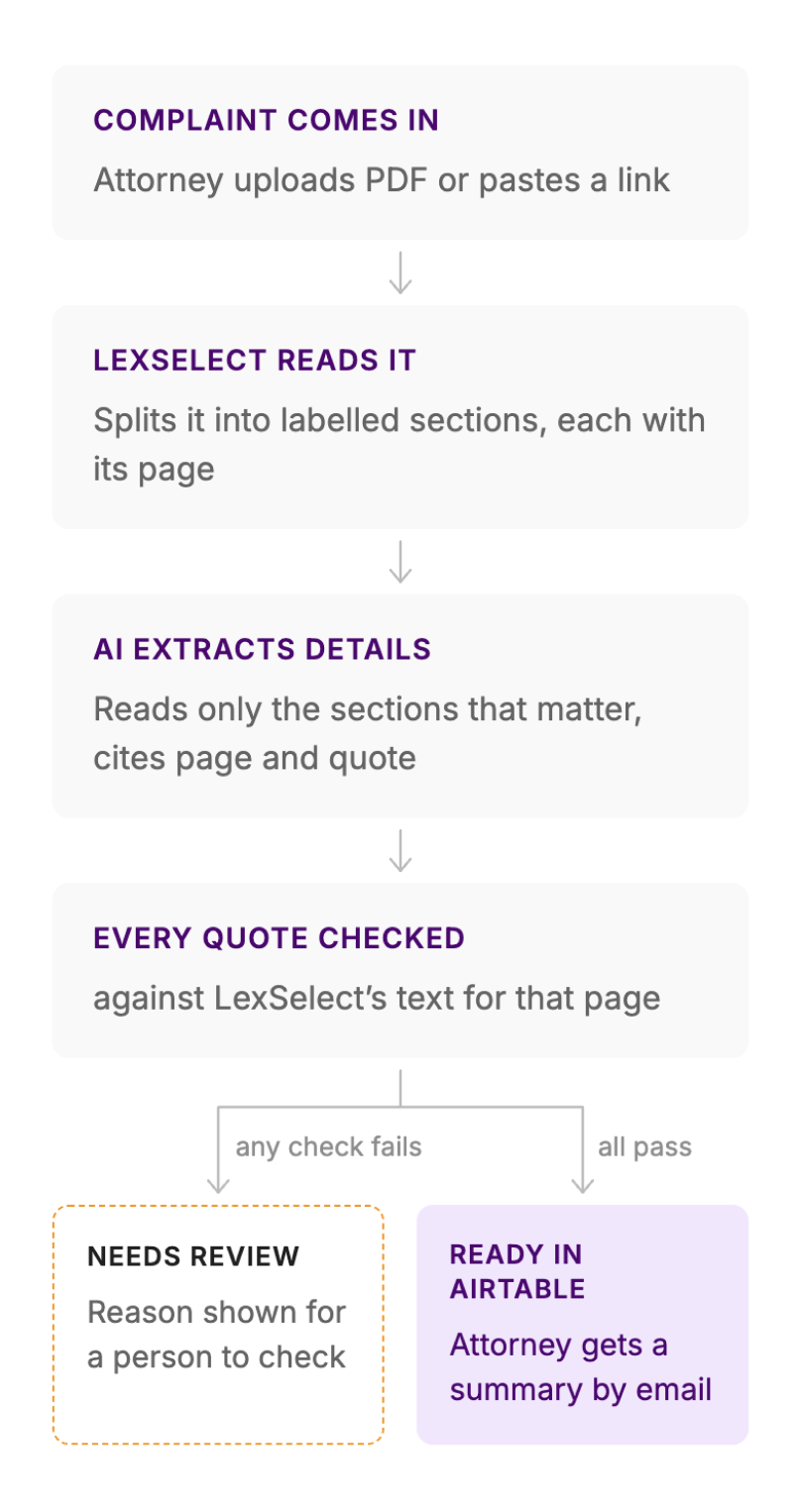
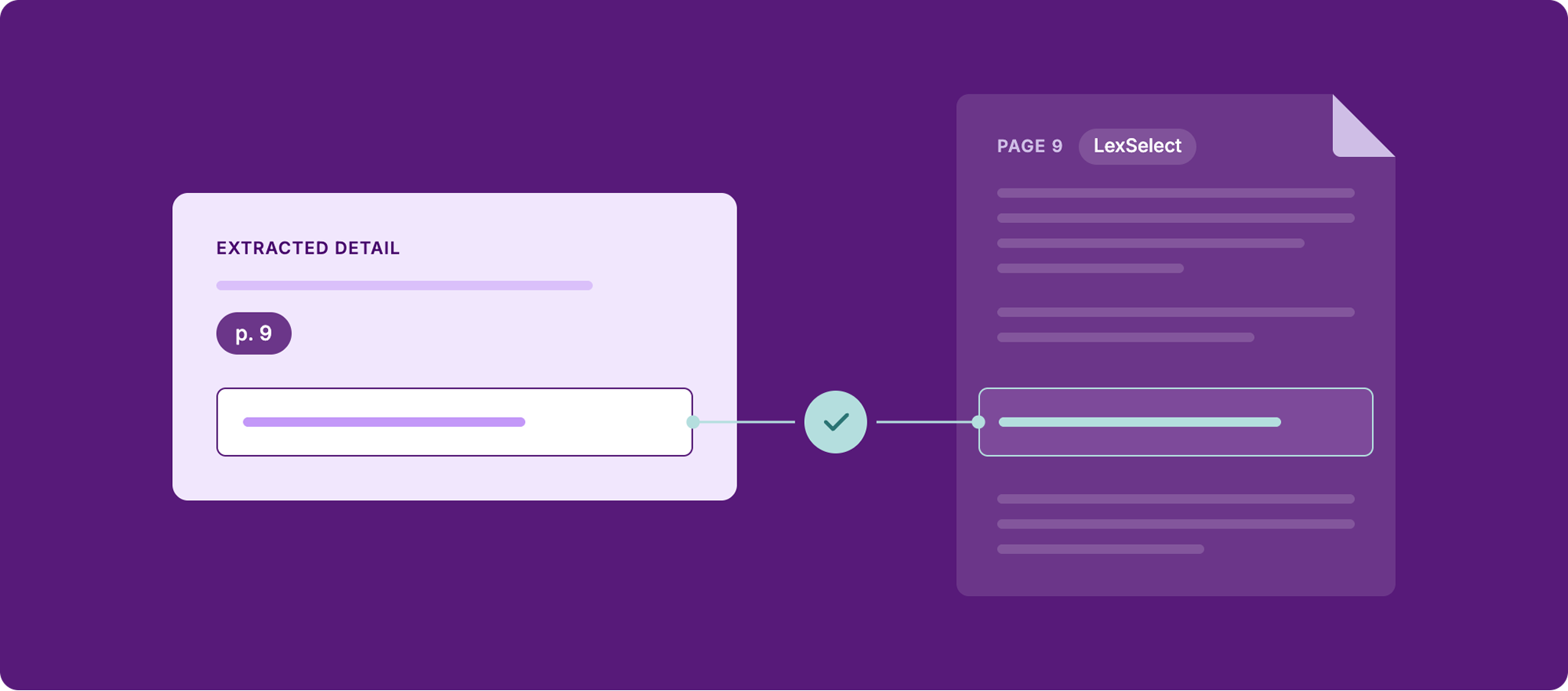
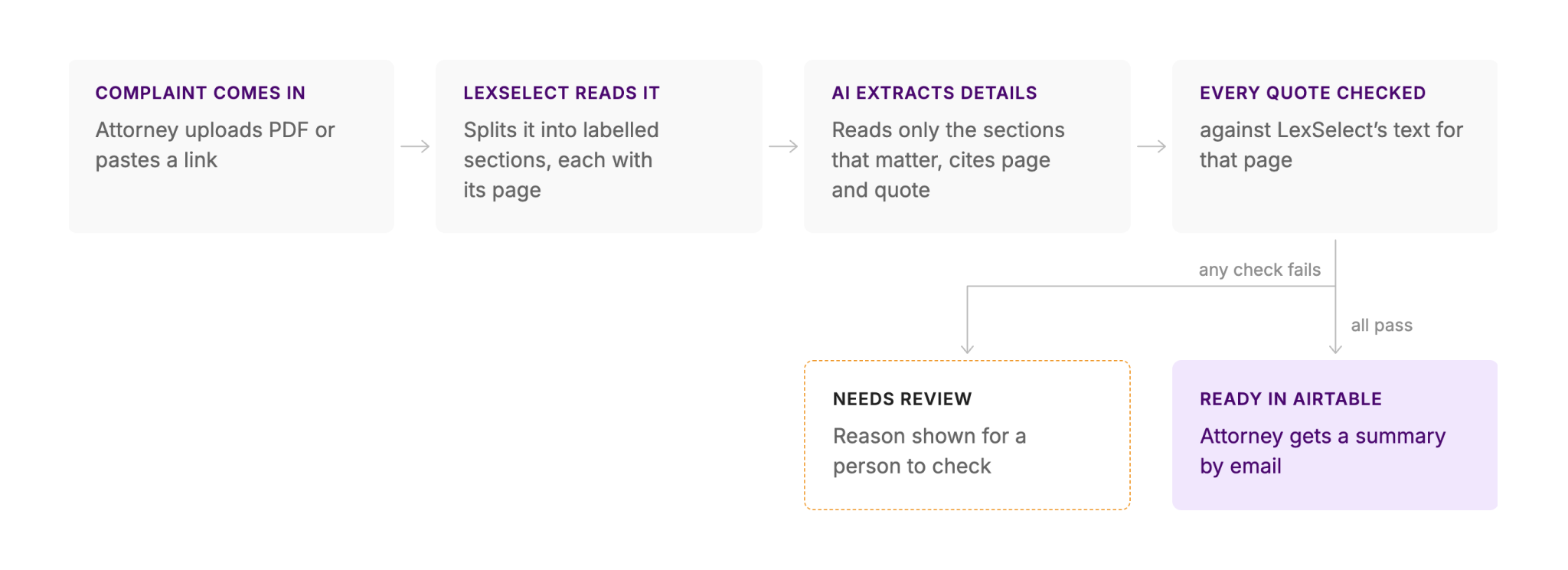
PraxisFlow built an n8n workflow that does this in about a minute. LexSelect reads the complaint and returns it as labelled sections, each tagged with its page. The AI model extracts the matter details from only the relevant sections, and has to cite a page and an exact quote for each one. Every quote is then checked against LexSelect's text for that page.

If every check passes, the matter lands in Airtable as Ready and the attorney gets a summary by email. If anything fails, the matter is marked Needs review instead of guessed.

In the recorded run, a 15-page federal complaint became a Ready matter in 44 seconds, with 16 of 16 references found on the cited page. Because the model reads only the sections it needs, LexSelect cut the cost of the AI step from $0.18 to $0.06 (3x less).

Before automation

The challenge

A complaint has to become a matter before anyone at the firm can work on it. That means reading the whole complaint to find the court, case number, parties, each claim, the relief sought and whether there is a jury demand. It is slow, repetitive work that someone at the firm has to do by hand before the matter can move.

Handing the PDF to an AI model looks like the shortcut, but it brings two new problems:

Cost
The model reads the whole filing, including the long factual sections intake does not need. Claude reads each PDF page as both text and an image, so a 30-page complaint came to about 70,000 input tokens, or $0.34 for the AI step.

Trust
A model can return a confident answer that is not in the document. If the attorney cannot tell which lines are right, they have to re-read the complaint anyway, and most of the time saved is gone.
PraxisFlow needed the speed of AI extraction with answers an attorney could check in seconds. To do that, the workflow has to know where each part of the complaint is and which page it sits on.
How it works

How the workflow works

Every detail is checked before a matter is created.
The attorney or paralegal only submits the complaint. Everything after that runs on its own, and no matter reaches Airtable as Ready unless every quote is found on its cited page.
Under the hood

What LexSelect adds

LexSelect is the step that makes the rest of the workflow cheaper and checkable.

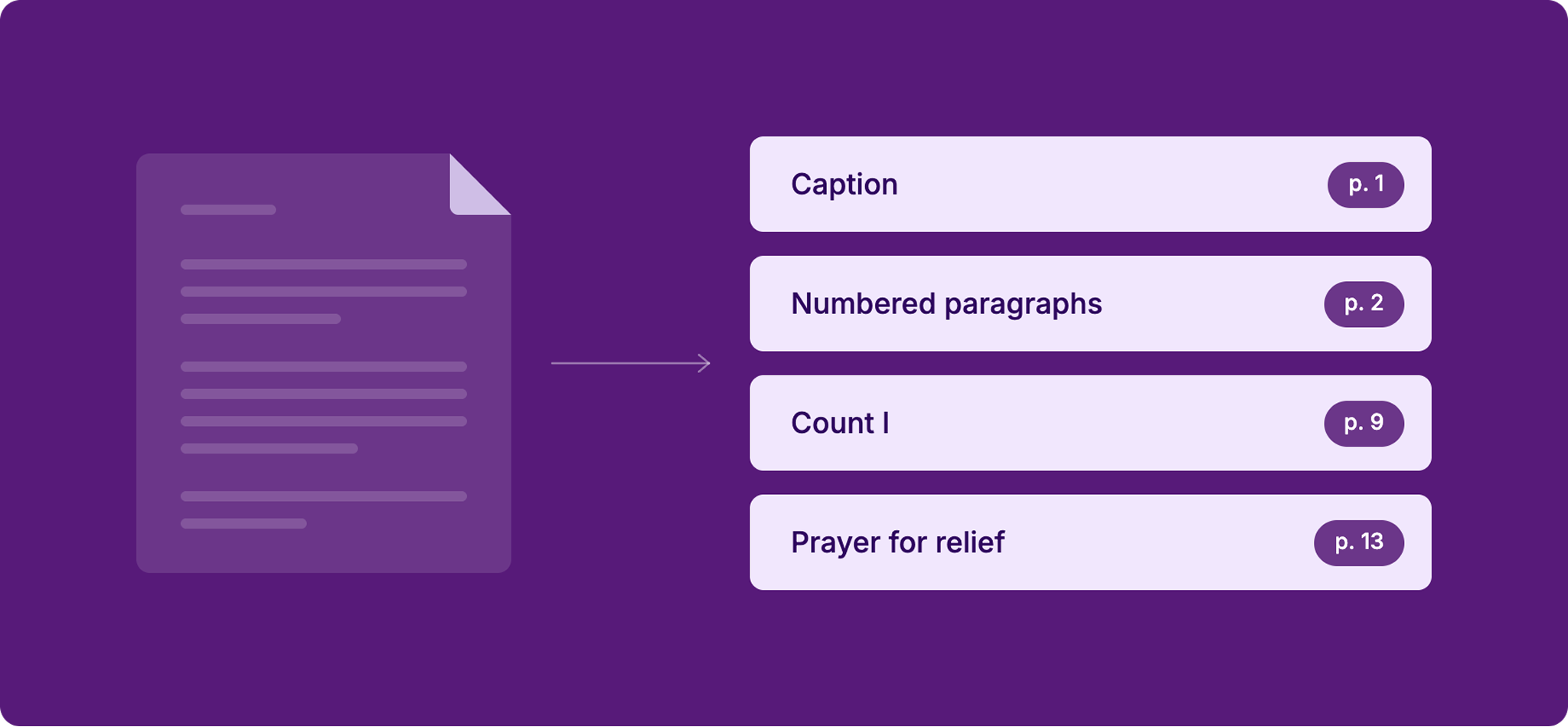
Labelled sections, each with its page

LexSelect reads the PDF the way a person would: the caption, headings, numbered paragraphs, each count and the prayer for relief. Every section keeps the page it came from, so each detail the model returns can be tied back to a place in the document.

The model reads only what matters

Because the sections are labelled, the workflow sends the model only the parts that hold matter details, not the whole filing. Across the three test complaints, that meant:
‍
• 50 to 78% fewer input tokens than the whole complaint as plain text
• 86 to 93% fewer input tokens than the PDF itself
• $0.06 to $0.09 per complaint for the AI step with LexSelect sections, against $0.18 to $0.34 with the whole PDF (Claude Opus 5.5 list prices)
‍
The gap grows with page count.

Every answer is checked against the page

The model has to return a page and an exact quote for every detail. The workflow then looks for that quote in LexSelect's text for the cited page. If the quote is not there, the check fails and the matter goes to a person instead of being created with a guess.
‍
PraxisFlow also ran the same three complaints with the whole PDF. On Golden Globes, the two runs ended differently:
• Whole PDF:
the automatic check flagged three correct citations (case number, filing date and court), which would have sent the matter to a person for review. The two-column caption on page 1 split the PDF's page text, so the quotes did not match as written.
• LexSelect sections: the model quotes from the same text the check uses, so this does not happen. The same complaint went straight to Ready.

Why PraxisFlow chose LexSelect

Before building, Javier Noguera, PraxisFlow's Systems Architect and Co-Founder, ran his own side-by-side evaluation on six public filings, 274 pages in total. The evaluation compared LexSelect's structured output with plain extracted text, using the same model, prompt and schema:
‍
• Citations: the LexSelect path resolved 24 of 24; plain text resolved 21 of 24, and all three misses were one page off.
• Input tokens: 51 to 93% fewer than plain text, depending on how much of each document was relevant.
The numbers

Results

PraxisFlow ran the workflow on three public complaints from the RECAP archive on CourtListener. Every citation checked out on two of them, and the third was sent for review instead of guessed. Run with the whole PDF instead, which Claude reads as both text and images, citation accuracy was about the same. The gain was a much smaller input, a lower AI cost and quotes that could be checked automatically.
Metric
Value
Time from submission to Ready matter (Golden Globes v. Golden Globe Foundation, 15 pages)
44 seconds
References found on the cited page, same run
16 of 16
Complaints where every citation checked out
2 of 3
Citations found on the cited page, all three complaints
70 of 71
End-to-end run time per complaint
44 to 70 seconds
Per complaint, input tokens sent to Claude and cost of the AI step:
Complaint
PDF sent to Claude (tokens)
Plain text sent to Claude (tokens)
LexSelect sections (tokens)
AI cost: PDF sent to Claude vs. LexSelect
Citations found with LexSelect
Sodexo v. SSM Health Care (16 pages)
38,095
10,825
4,868
$0.22 vs.
$0.08
22 of 22
Golden Globes v. Golden Globe Foundation (15 pages)
36,979
10,403
5,195
$0.18 vs.
$0.06
16 of 16
InfuCare v. Express Scripts (30 pages)
70,024
20,885
4,678
$0.34 vs.
$0.09
32 of 33
For firms and builders

Why it matters

For law firms, a new complaint becomes a ready-to-work matter in about a minute. Every line in the record carries its page, so the attorney can check any detail in seconds instead of re-reading the filing. When something cannot be confirmed, the workflow says so and shows the reason.

For automation builders, the split is simple: PraxisFlow builds the automation, LexSelect reads the documents. The same pattern carries over to other document-heavy work PraxisFlow automates for firms, such as contracts into checklists and filings into deadlines.

Client feedback

Zoe Zhang-Louie, CEO of PraxisFlow
At PraxisFlow, we build automations for law firms. We evaluated LexSelect for future workflows that would need to parse complex legal documents. On a set of public court filings, every citation we checked resolved to the correct source page, and LLM input tokens fell by 51 to 93%. When our clients’ workflows call for document parsing, LexSelect is the tool we’ll reach for.
Zoe Zhang-Louie,
CEO, PraxisFlow

Have filings to process? Let’s talk.

Try API
Try API
Book a discovery call
The data layer for legal AI.
Follow us on LinkedIn
Products
LexStudio / APILexChatLexEnterprisePricing
Resources
API DocumentationAPI PlaygroundHelp CenterBlog
Company
About Us
ContactContact
Trust & legal
Privacy policyTerms and conditionsTrust Center
LexStudio
Account Log InCreate Account
LexChat
Account Log InCreate Account
Designed & Developed by Black Peak Creative
Copyright © 2026 LexSelect