.svg)
Send a legal document.
Get back its structure.
One API call returns a complete, context-aware representation of your document: subdocuments, sections, tables, exhibits, and source coordinates, ready for AI, search, extraction, or any downstream workflow.

42
Layout classes in the document tree
Any
Legal document type, classified automatically
7
Input formats (PDF, DOCX, DOC, MSG, EML, ODT, RTF)
3
Output formats (JSON, Markdown, HTML)
LexSelect
Structure-first parsing, built for legal documents
General-purpose document AI
Extraction, not structure
Extraction
text · layout · tables

Text, layout, and tables extracted natively, in reading order
The basics are covered
Source attribution
coordinates, inside the tree
Every word's exact position comes back inside the tree, with the context around it.

Bounding boxes come back as separate elements
Multi-page tables
continuation tracking
A table that crosses pages is tracked as one table
Each page's fragment comes back as a separate table
Exhibits & sub-documents
detection · linking
Exhibits, schedules, and attachments are detected as sub-documents and stay linked to their parent
Exhibits blend into the parent document
Hierarchical depth
the node tree
A structured tree of 42 layout classes, nested all the way down.
Flat output: a list of blocks, no hierarchy.
Document classification
legal categories
Every document classified automatically: affidavits, motions, contracts, transcripts.
A lease and a deposition transcript parse identically
Transcripts
question & answer pairing
Depositions and hearings come back as numbered question-and-answer pairs
Transcript structure is lost. Just lines of text.
The complete document structure, as a node tree
The default output. A structured outline of the whole document, with every element nested where it belongs, carrying its type, its position on the page, and everything inside it.
Capabilities:
- 42 layout classes: sections, paragraphs, tables down to rows and cells, transcript Q&As, seals, footnotes.
- Numbering preserved: paragraph numbers, transcript line numbers, question-and-answer pairs.
- Per-node metadata: reading order, columns, cross-page table links, handwriting.
- Automatic document-type classification, no setup required.
Plain text, in reading order, with no layout artifacts
One line per LINE node, joined with newlines. No scrambled columns, no OCR noise. Accurate on scanned documents and multi-column layouts, because it's derived from the tree, not raw OCR.
Capabilities:
- Reading order preserved across multi-column layouts.
- Strip headers and footers with exclude_node_types=header,footer.
- Comes from the same tree, not a separate, independently re-run extraction.
- One string per page, newline-joined. No nested JSON to parse.
Tables extracted with headers intact, across page breaks
Every table returned as {headers, rows}, one entry per page. Headers stay bound to columns regardless of how many pages the table spans. Multi-page continuation handled automatically.
Capabilities:
- Multi-page continuation is tracked. Pair with include=tree to see which tables span page breaks.
- Column header binding: values always know which column they belong to.
- Every table traces back to its exact node in the tree.
- Handles tables with no header row: returns an empty array instead of guessing.
The tree flattened into a sequential list of typed blocks
A flat, sequential list of content blocks (HEADER, FOOTER, SECTION, LINE, TABLE, SUB_DOCUMENT), each with {id, class, text}. Easier to consume for pipelines that don't need to walk a tree.
Capabilities:
- Blocks appear in document reading order, top of the page to the bottom.
- Each block carries its node ID, class, and text content.
- Combine with exclude_node_types to strip boilerplate before ingestion.
- Consistent output shape across all document types.
Custom fields as key-value pairs
Need specific fields, such as names, dates or case numbers? The kvps slice returns configured fields as a flat {key: value} map.
Capabilities:
- Fields tailored to your document types, such as intake forms, petitions and contracts.
- Returned per page as a flat {key: value} map, ready for a CRM or database.
- Combine with tree for field values in full structural context.

1. Prepare
The file is hashed for integrity, normalized, and split into page images.
2. Read each page
OCR pulls the text while vision models detect layout, tables, and sub-document boundaries, and each page gets a document-type read.
3. Assemble the tree
Text and vision fuse into one structured hierarchy, from regions to sections to lines to words, every element classified.
4. Link and finalize
Sub-documents like exhibits and schedules are injected into the tree with the pages they own, multi-page tables are stitched into one, and the completion event fires.
AI products & agents
Structure an AI can search, cite, and navigate
Flat-text inputs make AI products hallucinate on complex PDFs. The tree slice fixes that two ways: retrieval pipelines get chunks with exact coordinates, so an answer can be traced back to its source instead of taken on faith. Agents doing more than answering a question (checking a clause, jumping to the exhibit it references, coming back) get the same tree as a hierarchy to walk instead of a bag of chunks to search.
Operations
Automating document intake
An operations team receives hundreds of documents every week, from case files to contracts to intake forms, and needs the details inside them in their CRM, not retyped by hand. The kvps slice extracts the specific fields they've configured, such as names, dates, and case or matter numbers, and a webhook pushes the structured result into their CRM the moment processing finishes.
View case studyFinancial & billing
Getting straight to the numbers
A platform processing invoices, fee schedules, or itemized statements needs the numbers inside the tables, not the surrounding prose. The tables slice returns headers and rows exactly as they're laid out on the page, ordered and ready to map straight into a spreadsheet or ledger, without parsing the rest of the document to get there.
Content & research
Structural context, not just clean text
Search relevance depends on more than clean text: a match from a heading shouldn't rank the same as a match from a footnote. The text slice feeds the embedding pipeline; the tree slice tells the ranking which kind of node each match came from.
Consistent output across every document type, from the backfile onward.
Consistent output across every document type, from the backfile onward.
Patents & technical filings
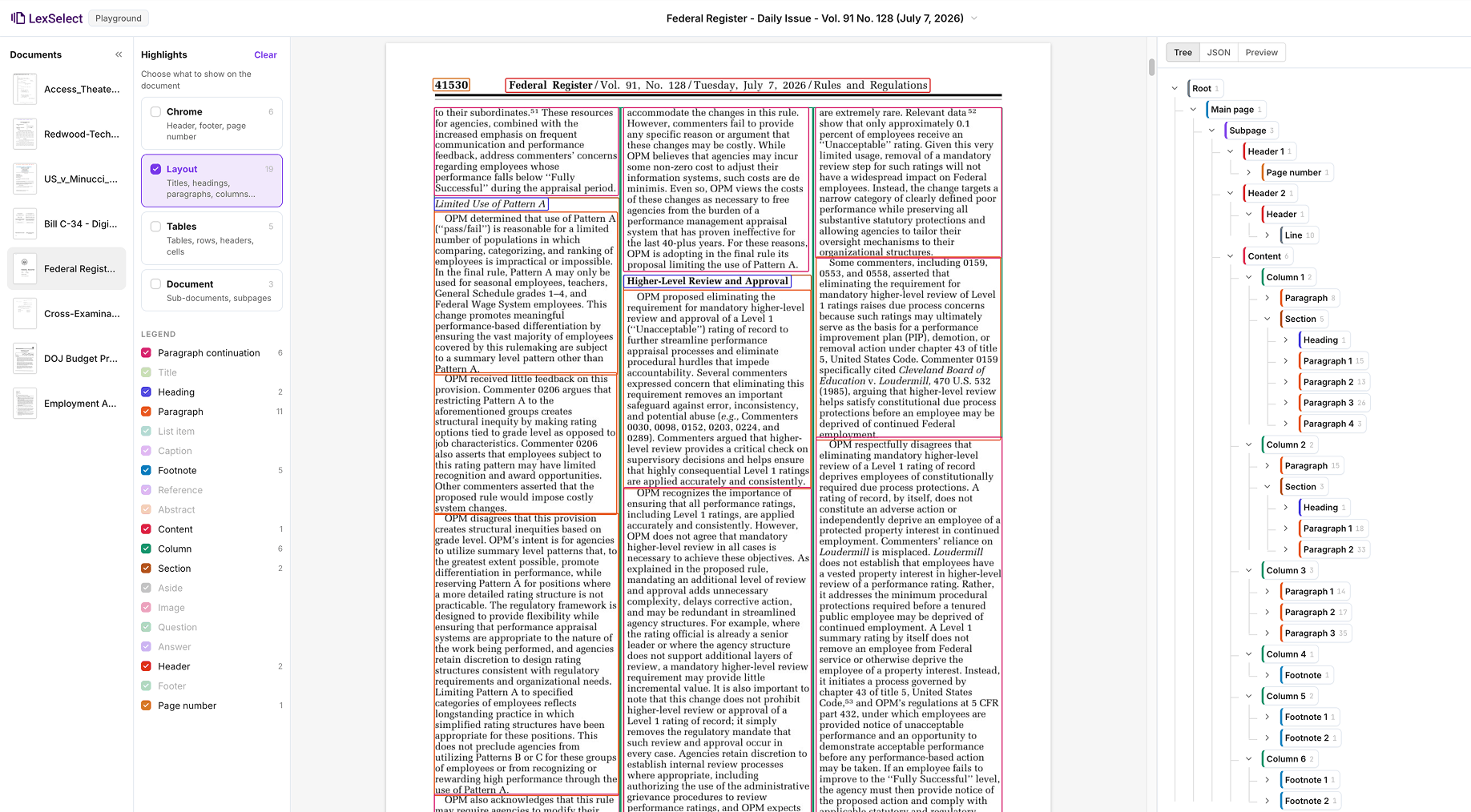
Making multiple-column patents actually searchable
A team building a search or analytics tool over patents and technical filings keeps hitting the same problem: read a generic parser's output straight through and text from the left column bleeds into the right mid-sentence.
LexSelect detects column layouts explicitly and returns text in actual reading order, down one column, then the next.
LexSelect detects column layouts explicitly and returns text in actual reading order, down one column, then the next.
Intake & triage
Sorting a mixed inbox automatically
A team receives a mix of contracts, invoices, correspondence, and scanned mail, and needs to identify each file before deciding what happens next.
Every parse classifies the document automatically, from affidavits and motions to contracts and transcripts, so files can be routed without someone opening each one first.
Every parse classifies the document automatically, from affidavits and motions to contracts and transcripts, so files can be routed without someone opening each one first.


Full encryption (TLS and AES-256)
All data is encrypted in transit and at rest, ensuring confidentiality throughout processing and storage.

Immutable storage for audit history
Outputs can be stored in tamper-resistant formats to support audit trails, compliance workflows, and client reporting requirements.

Secure, distributed architecture
Deployed on fault-tolerant, containerized infrastructure with optional data-residency controls to meet jurisdictional and regulatory requirements.

Enterprise-grade access and privacy controls
Role-based permissions, strict data isolation, and SOC 2 Type 2 audited security controls. See the details in our Trust Center.