.svg)


A lawyer using an AI tool must verify its answers against the source, and the referenced text must be accurate and reliable. Without that, the tool is unusable for work that matters. Reliable source text depends on how accurately the document was parsed: whether the text survived, whether the surrounding structure was preserved, and whether the text retained its context within the document as a whole.
To test how accurately LexSelect parses complex legal documents, we started with two basic page-level accuracy tests and compared our results against six other parsing platforms. LexSelect won both: finding and correctly labelling content, and locating it precisely enough to select a complete passage.
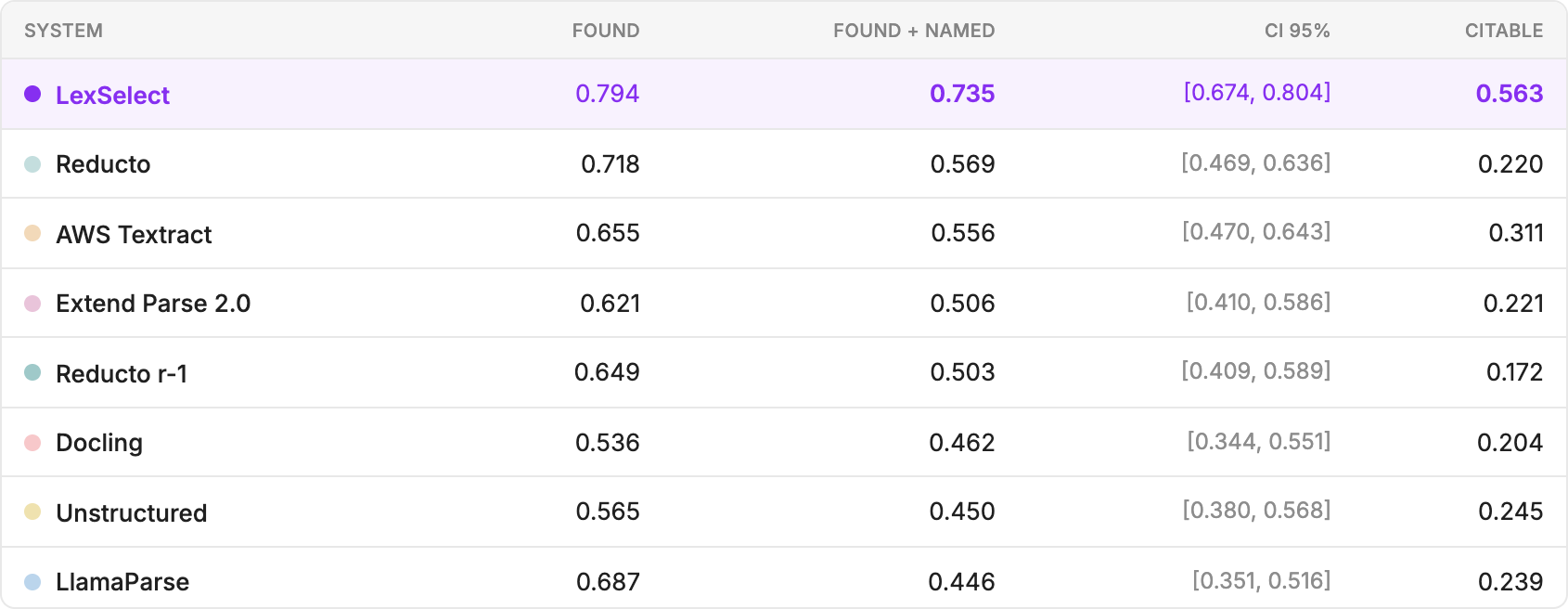
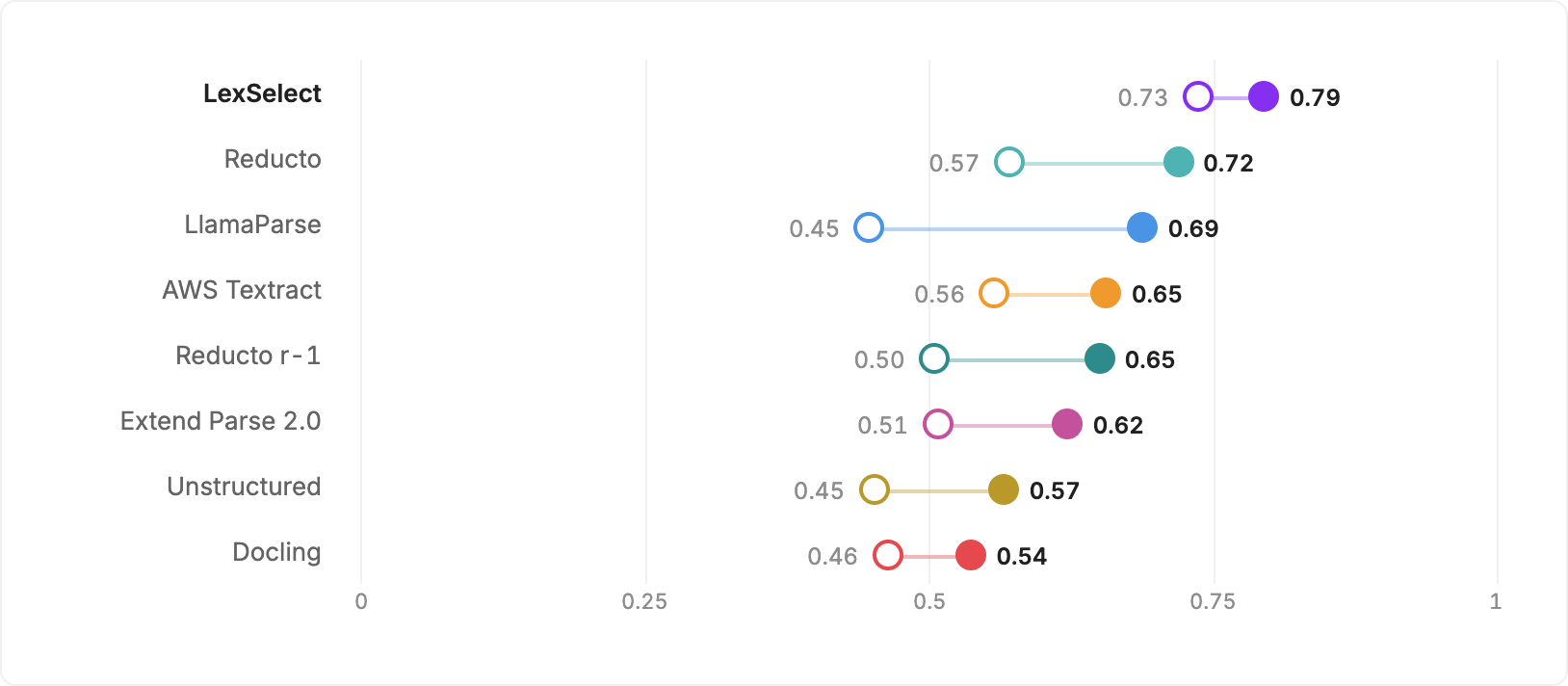
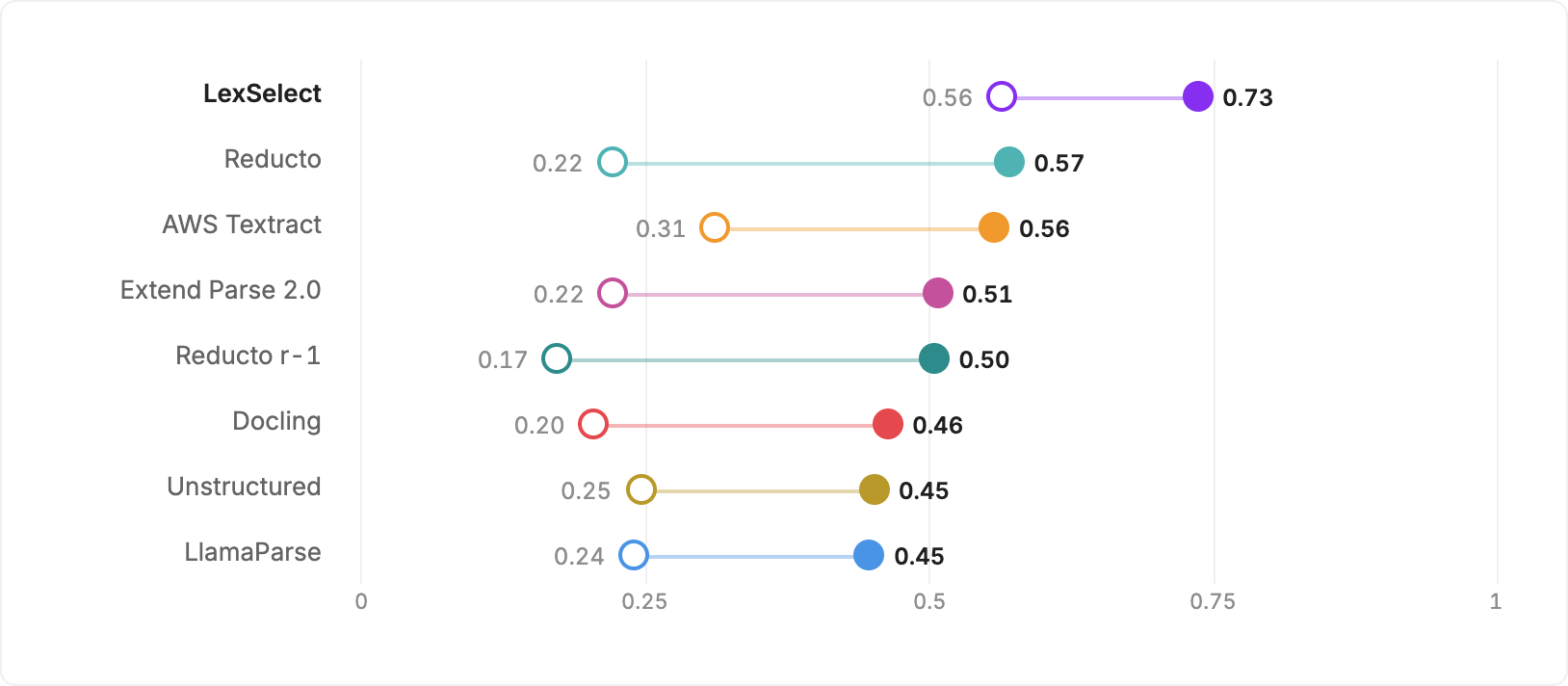
LexSelect scored 0.735 against Reducto’s 0.569 on standard layout (29% higher) and 0.563 against AWS Textract’s 0.311 on the stricter citable standard (81% higher).
Both scores run from 0 to 1; higher is better. They balance missed regions against incorrect detections. The percentages show relative differences in parsing scores, not the accuracy of downstream AI answers.
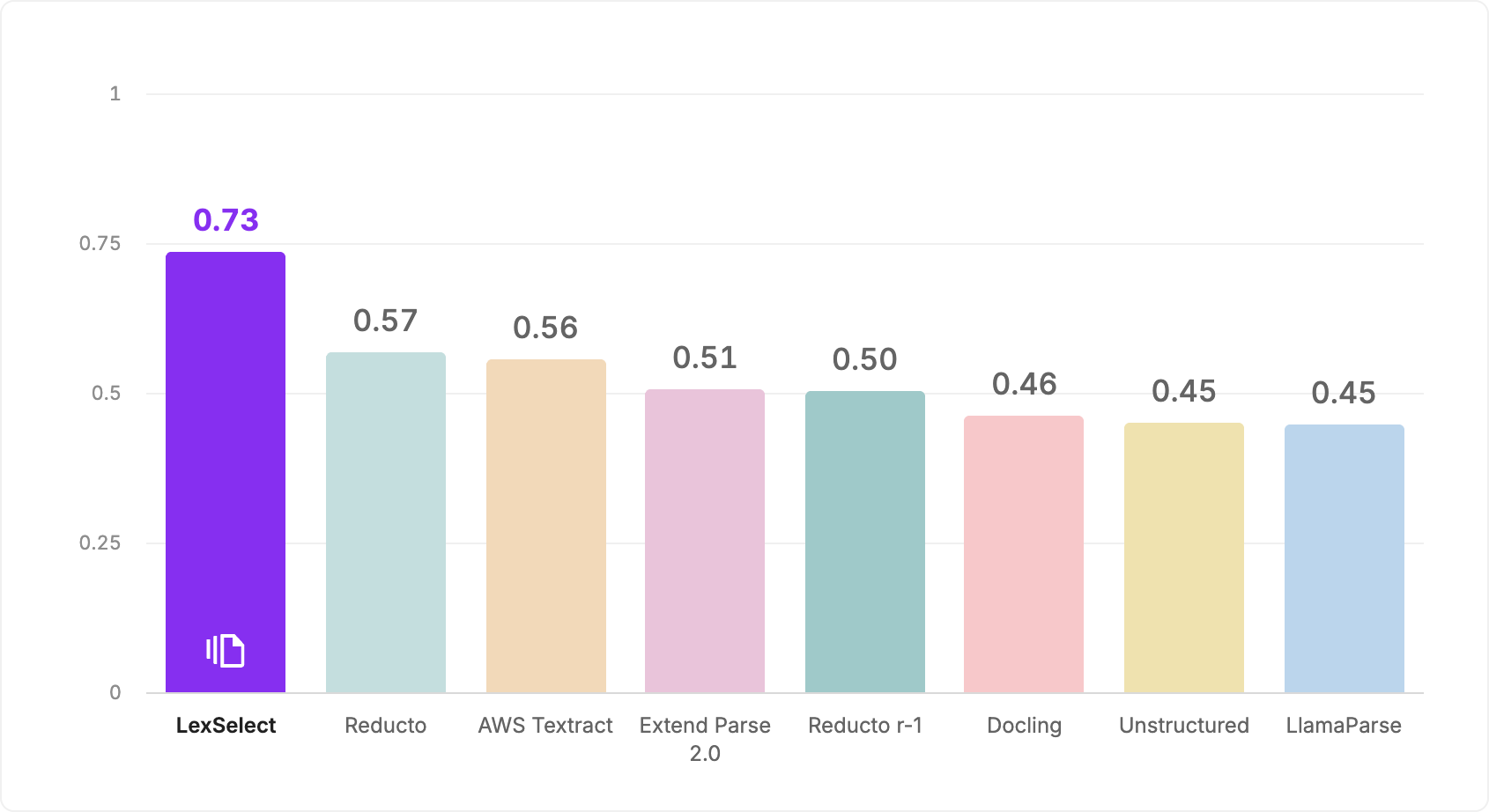
LexSelect’s lead holds across the reported confidence ranges: its lower bound of 0.674 exceeds every competitor’s upper bound, the highest being 0.643. Its confidence interval is also the narrowest, indicating less variation in its overall score when the documents are resampled.
These are basic requirements for a parsing engine. LexSelect’s broader value lies in preserving structure across the whole document: exhibits within an affidavit, nested clauses and sub-clauses within an agreement, and table values whose meaning depends on a column heading ten pages back. That structure improves downstream accuracy, makes source references more reliable and reduces LLM input tokens by allowing each task to use only the content it needs.
What we tested
Our reference set contains 21,660 human-labelled regions across 917 pages of 24 public-record documents. A region is a block of content, such as a paragraph, table or footnote. The documents include depositions, trial transcripts, pleadings, agreements, bylaws, a Federal Register issue, scanned insurance forms, a procurement RFP and a patent. No synthetic documents were used.
Humans drew and classified the regions, then peer-reviewed the labels. Every parser tested received the same PDFs and went through the same scoring process, including LexSelect.
We asked three questions: did the parser find the content, recognize its role and locate its boundaries precisely? These distinguish finding a footnote from recognizing it as a footnote, and finding a paragraph from locating all of it accurately.
How to read the scores
Finding the content and recognizing its role
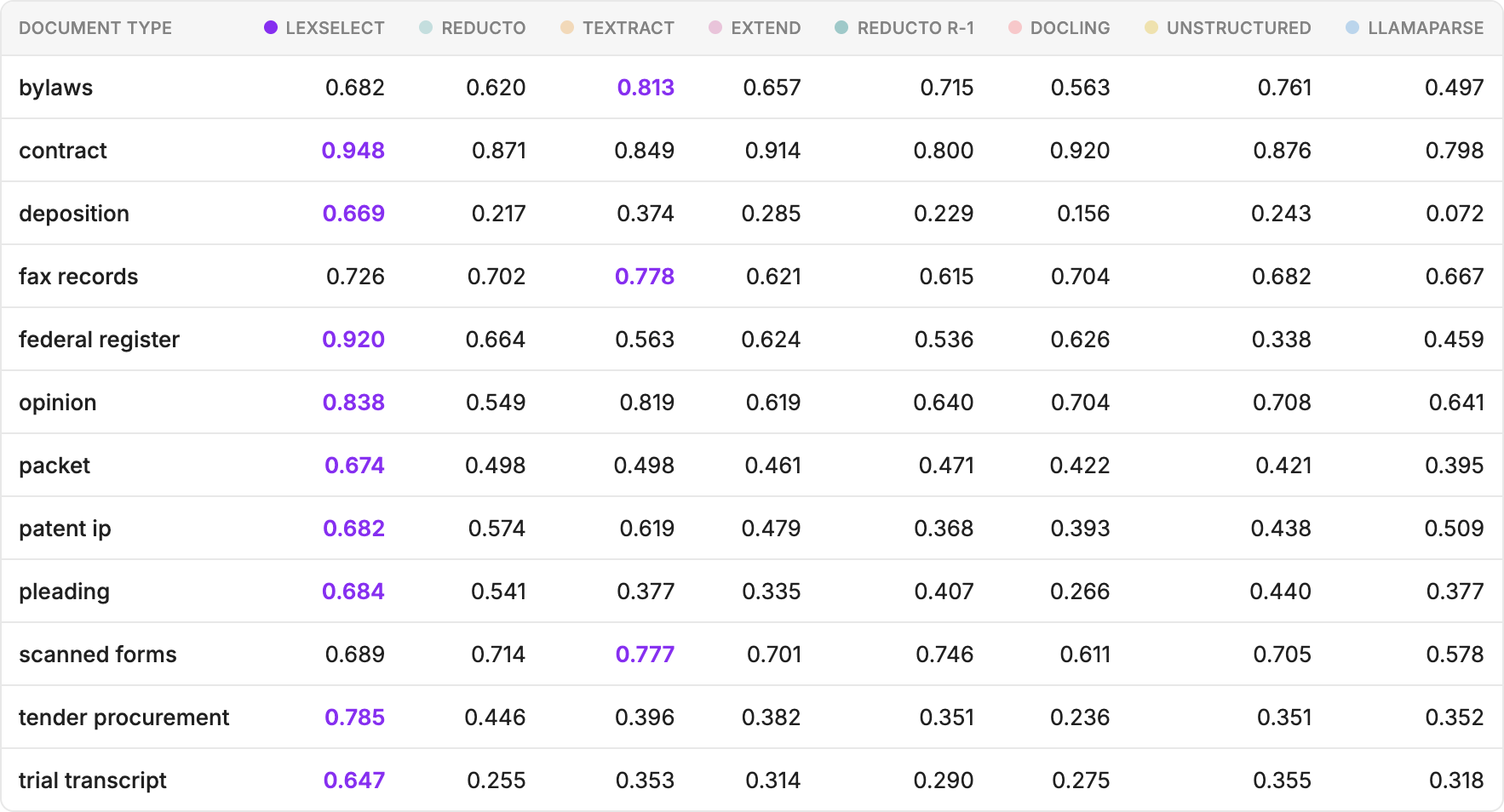
LexSelect leads 9 of 12 document categories. Its largest absolute margins over the next-best parser are on procurement documents (0.785 versus 0.446), depositions (0.669 versus 0.374), and trial transcripts (0.647 versus 0.355). It also leads on Federal Register documents, at 0.920 versus 0.664.
Finding content and recognizing its role are separate skills. When correct labels are required, LexSelect’s score falls by just 0.059, from 0.794 to 0.735, the smallest reduction among the parsers tested. Reducto falls from 0.718 to 0.569, and LlamaParse from 0.687 to 0.446. Much of LexSelect’s lead comes from identifying what a region is.
Footnotes show why that matters. Across 748 reference footnotes, LexSelect scores 0.936 and Docling 0.935 on standard layout. The other six configurations score zero on that class. A zero does not necessarily mean the words disappeared: they may have been returned under another label.
In Reducto’s results, 571 reference footnotes were labelled as body text and 474 page numbers as running headers. A footnote can qualify the passage above it; a page number helps locate a reference. When those roles are lost, the next system has to reconstruct them.
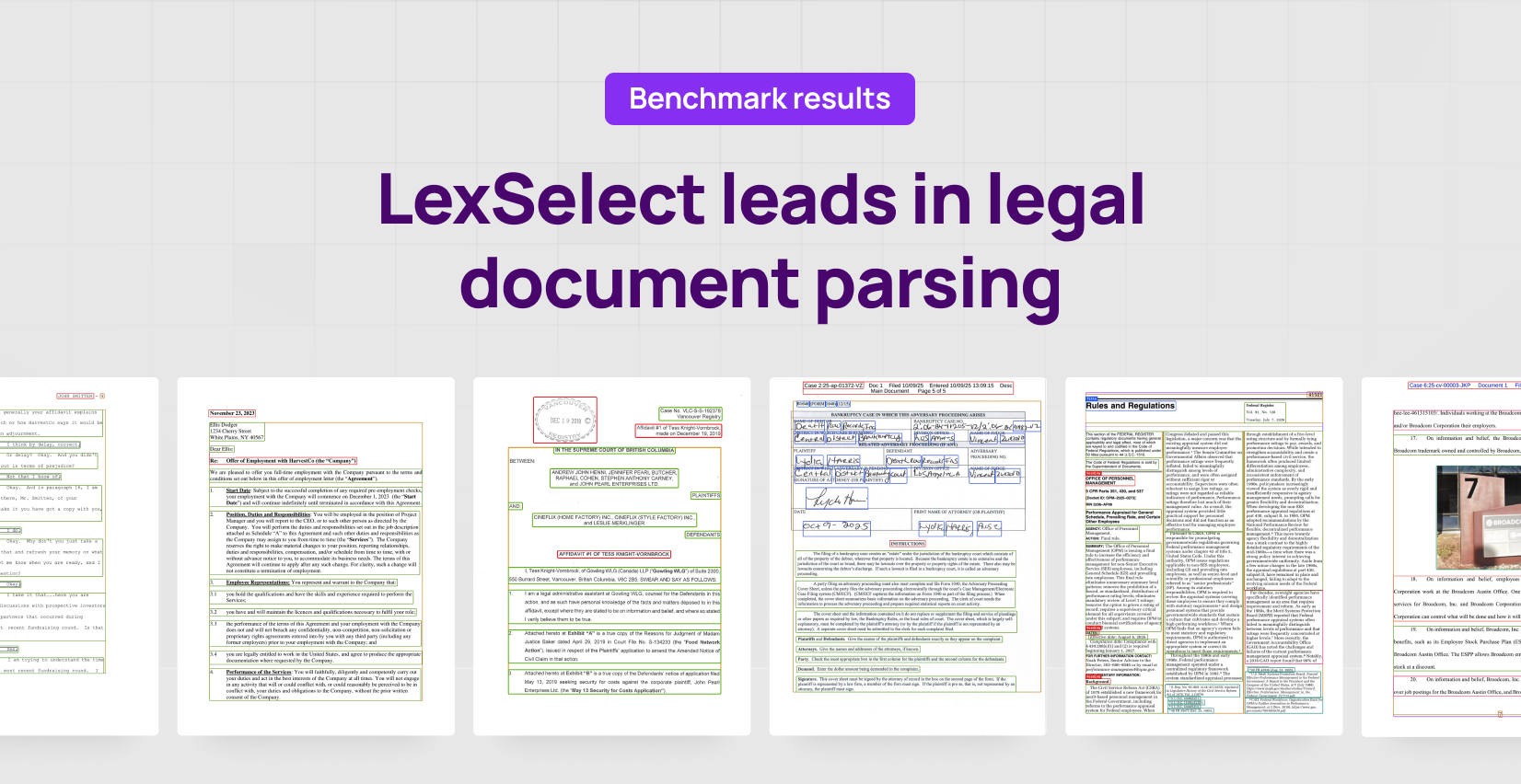
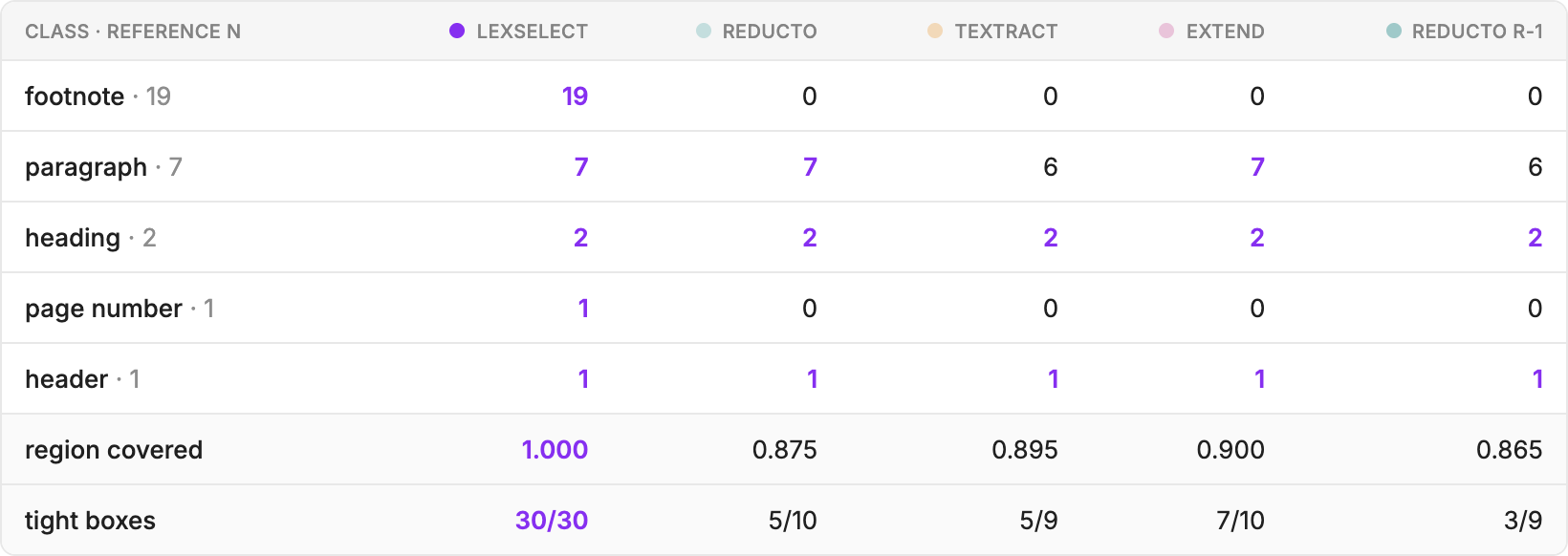
On the Federal Register page, LexSelect identifies all 19 footnotes. In the four competing outputs shown, the words survive but their identity as footnotes is lost.

Why the boundaries matter
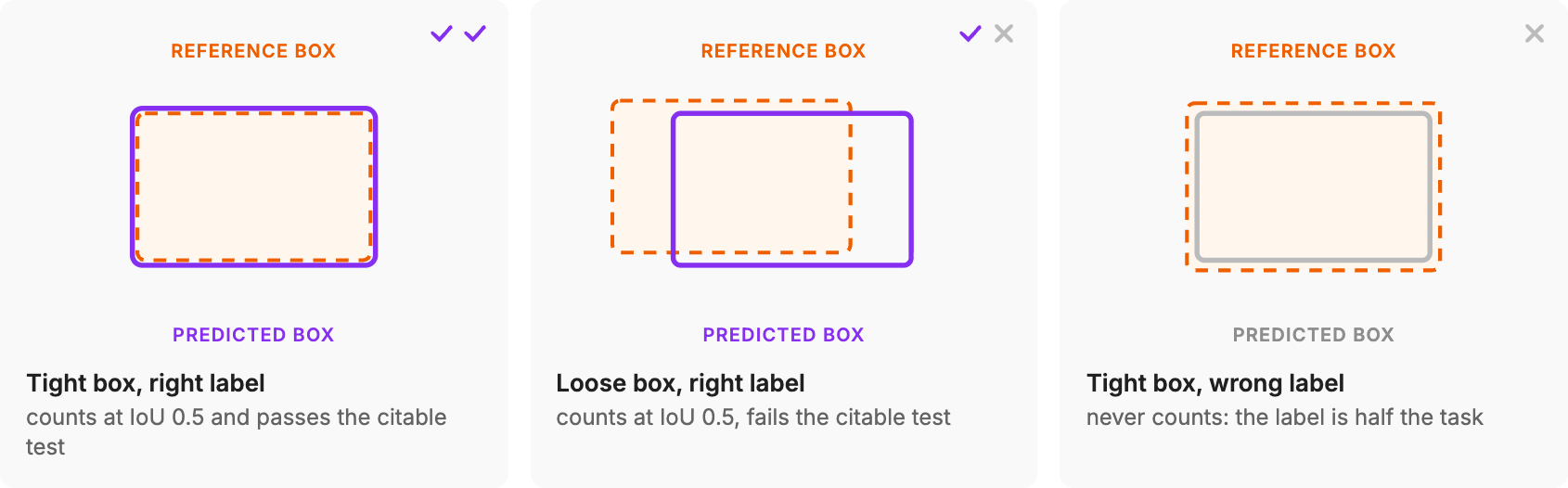
A predicted box can pass the standard threshold while missing the last line of a paragraph or extending into neighbouring text. That matters when a product uses the coordinates to select content or highlight a supporting passage for a user.
The citable standard tests whether those boundaries are tight enough to capture almost all the passage without pulling in neighbouring content.
LexSelect scores 0.563 against AWS Textract’s 0.311, ~81% higher. Its confidence interval is 0.423–0.701. The lower bound exceeds every competitor’s upper bound, the highest being 0.394.
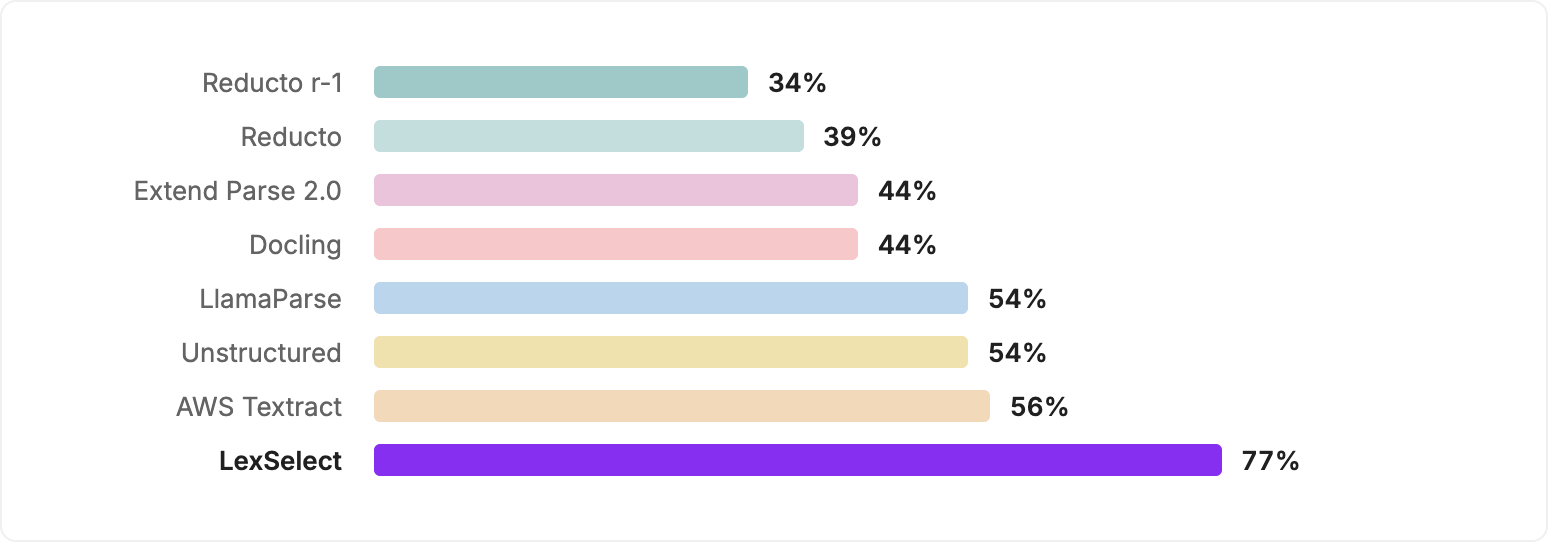
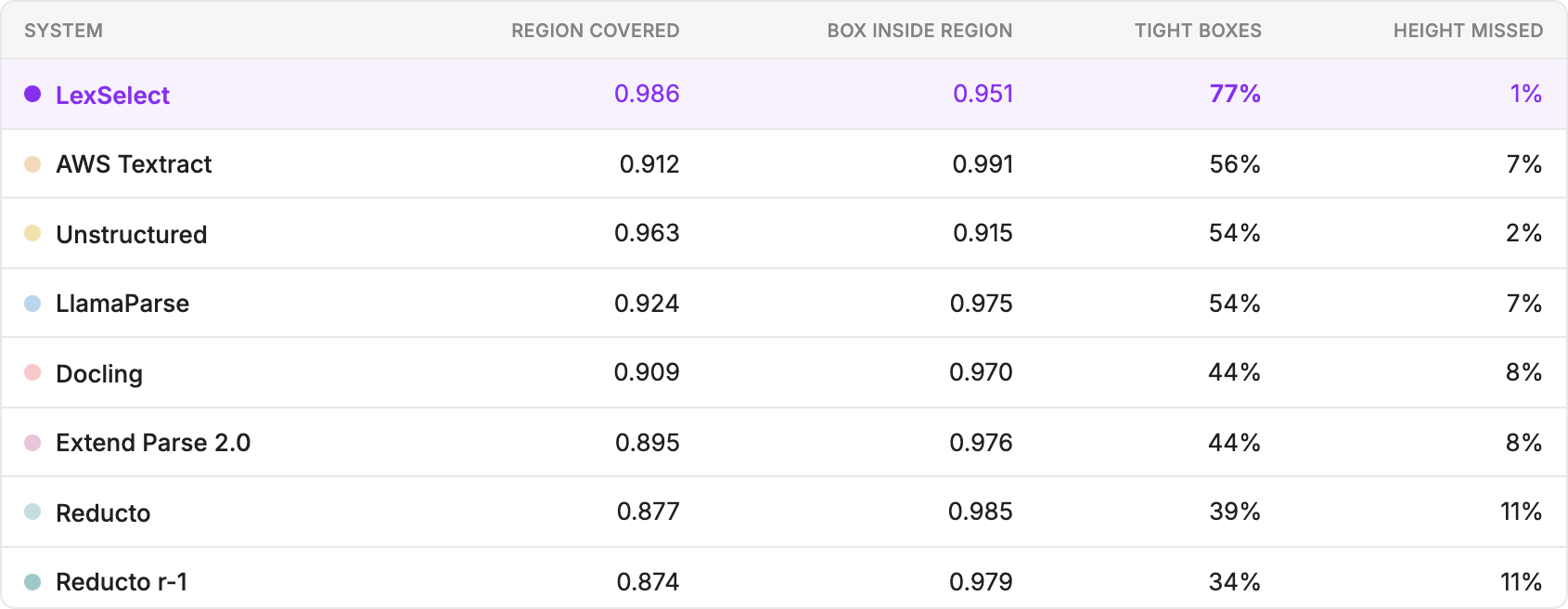
Among regions matched on the standard measure, 77% of LexSelect’s boxes meet the tighter requirements, compared with 56% for AWS Textract. This describes successful matches; the citable score also accounts for misses and incorrect detections.
A box can leave part of a passage out or pull neighbouring content in. The table below measures both: how much of the region is covered, and how much of the box stays inside it.
A scanned-forms example shows why the distinction matters. On page 5 of the insurance forms document, AWS Textract scores higher on standard layout: 0.947 against our 0.881. Yet 25 of LexSelect’s 26 matched regions meet the tighter requirements, compared with 0 of 27 for Textract.

The citable score measures classification and precise source location. It does not measure character-level text accuracy, answer correctness or whether a passage supports a claim. Those need testing in the workflow using the data.
Faster document processing
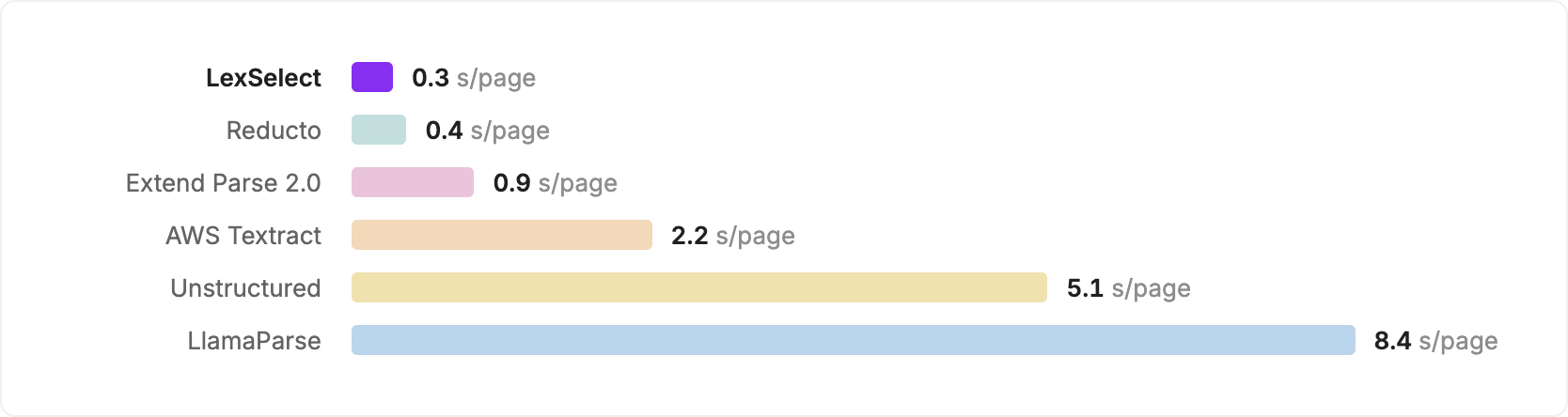
And it's fast. LexSelect processed pages at ~0.3 seconds per page through the full pipeline, compared with 0.4 for Reducto and 2.2 for AWS Textract. In our testing, LexSelect maintained that rate on documents up to 2,000 pages.
Preserving the structure of the whole document
Finding regions accurately is an important part of making a legal document useful. The relationships between them matter just as much to the workflow.
Consider a reference to paragraph 12 of an application inside an exhibit appended to a 400-page affidavit. To find the correct paragraph, a workflow needs to identify the application and the exhibit, and distinguish it from paragraphs elsewhere in the combined document. A collection of page-level boxes leaves those relationships to be worked out.
We built LexSelect to preserve them as structured data.
Sub-document detection identifies exhibits and other constituent documents within an assembled record. A workflow can address each document in the context of the larger filing.
Nested sections, clauses, paragraphs and sub-paragraphs preserve which content belongs together. Paragraph 3(a)(ii) remains connected to 3(a) and the clause above it. A workflow can retrieve the parent wording alongside a passage, retaining a condition or qualification that could be lost if the passage were used alone.
Continuity across pages keeps a clause, paragraph or table connected when it crosses a page break. A table value retains the context of its column heading. Source coordinates link the content to its original page and position for navigation, highlighting and checking.
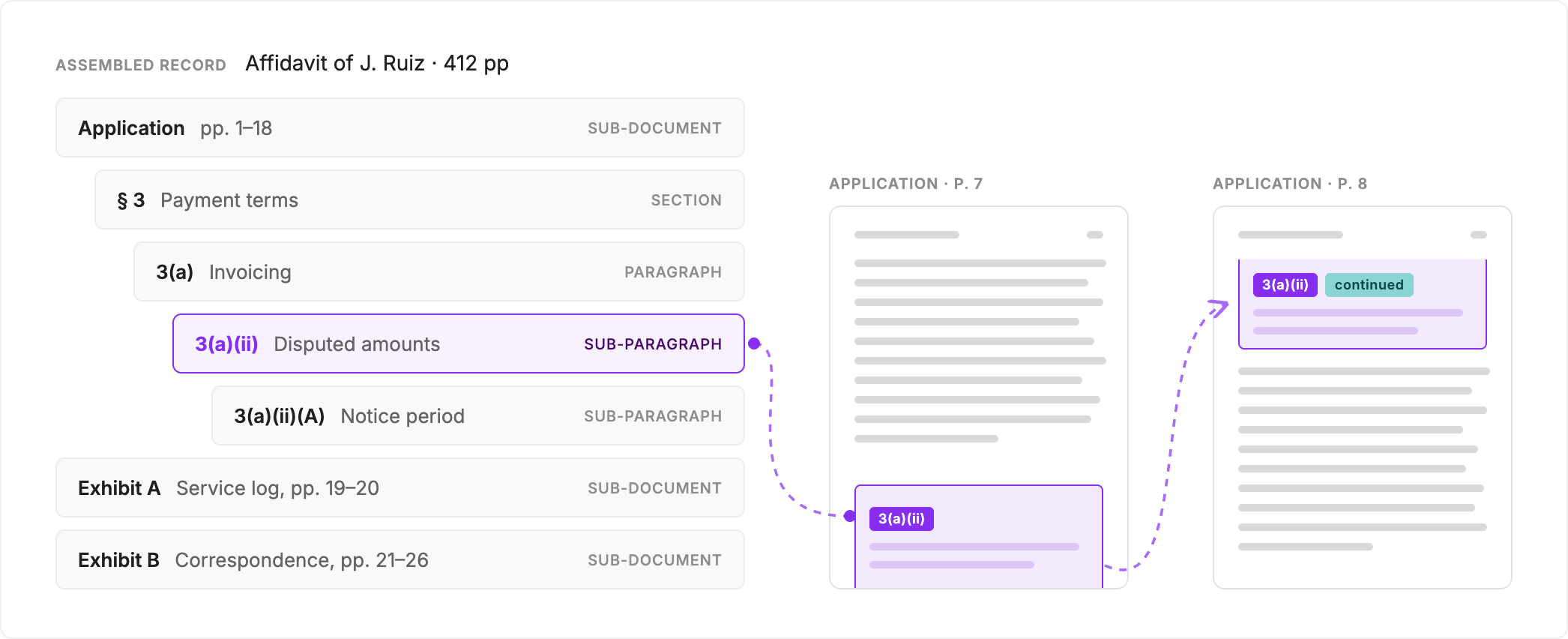
This gives developers a useful choice: select an exhibit, retrieve a paragraph with its sub-paragraphs, or include a surrounding section when a passage needs more context. The selected content retains its connection to the source.
It also explains our architecture. Separate components detect elements and assemble the document-wide structure, dividing the work involved in processing long, complex documents.
The layout benchmark does not measure this full hierarchy or test how the system scales. Partner evaluations provide early evidence of what the additional structure enables.
What partners are seeing
An API partner building AI tools for judges told us our sub-document splitting was the reason LexSelect won its evaluation. Identifying sections and exhibits within a compendium helps it link citations to the right document and page, where a judge can check the source. The same partner reported early measurements of 20–40% better downstream accuracy.
Another partner reported that 100% of the source references it checked were correct and that its workflow used ~51% fewer input tokens in an initial evaluation. Tokens are the pieces of text a model processes. The reduction came from selecting task-relevant paragraphs and tables; sending the full parse would have used more tokens than plain text. Structure made selection possible while retaining source information.
The data foundation for trusted AI
Our partners are building tools for legal and other trust-based professions. Their users remain accountable for the accuracy of their work. Legal professionals need to inspect the source, understand its context, and decide whether it supports a conclusion. Helping them do that is part of earning the confidence to take on more of their work.
LexSelect supplies the data underneath those tools. Preserving content, document-wide relationships and source locations enables partners to build workflows that are verifiable and reliable. Our mission is to give legal professionals the data infrastructure they need to rely on these tools for their most critical tasks, using the most complex legal documents.
Legal is our first market and proof point. The same requirements apply wherever trust-based professional decisions depend on complex documents. Our broader vision is to become the structured data layer for complex documents across enterprises.
Explore your own documents in LexStudio, our self-serve API developer platform. Create an account and your own API keys to test LexSelect directly. The built-in Playground lets you upload documents and see their structure overlaid on the source pages—no coding required.
For questions about the benchmark or how we labelled and scored the documents, contact me on LinkedIn or at morgan@lexselect.io.